
Weather sensor to Arduino Cloud (using the rtl_433_ESP library)
— By ttyrex
This project demonstrates how to use an ESP32 paired with a CC1101 radio chip to read data from a weather sensor and upload it to the Arduino Cloud for visualization. It is highly adaptable to various devices due to its reliance on the rtl_433_ESP library.
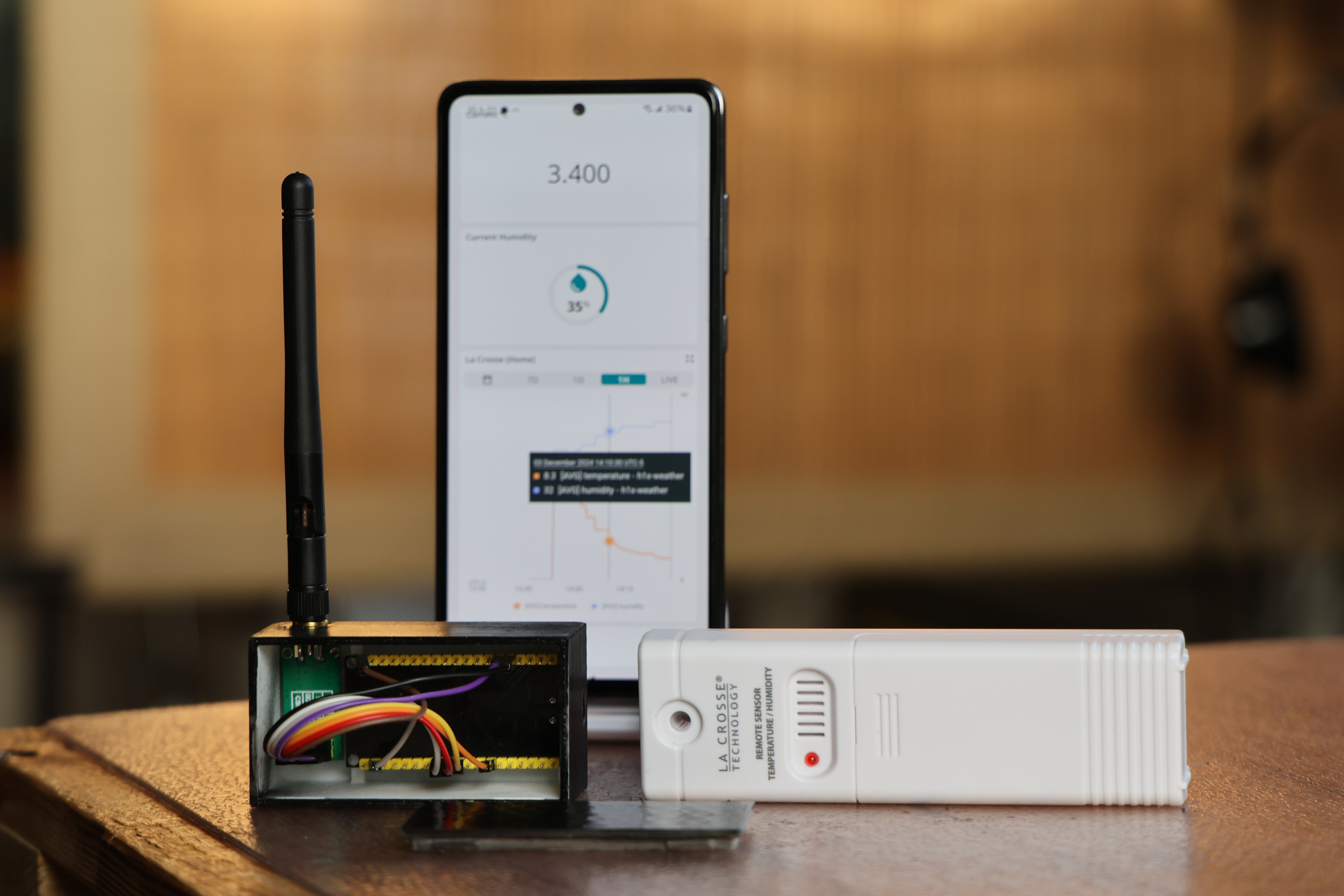
Components
- CC1101: Low-power Sub-1 GHz wireless transceiver
- esp32 WROOM32
Apps and platforms
Project description
Summary
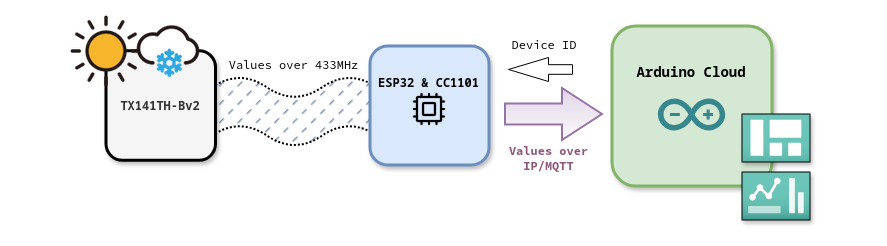
This project shows how to use the rtl_433_ESP library with an ESP32 and a CC1101 radio chip to read data transmitted from a La Crosse TX141TH-Bv2 weather station (operating at 433 MHz ).
We use a Device ID to filter signals and capture data from a specific sensor. This ID is obtained from the Cloud, while the temperature and humidity values are uploaded to it.
This can be customized for any device compatible with rtl_433_ESP. Also, by using a similar approach, you can easily adapt the code to read multiple sensors, with the ESP32’s memory being the only limitation.
Dashboards and Variables
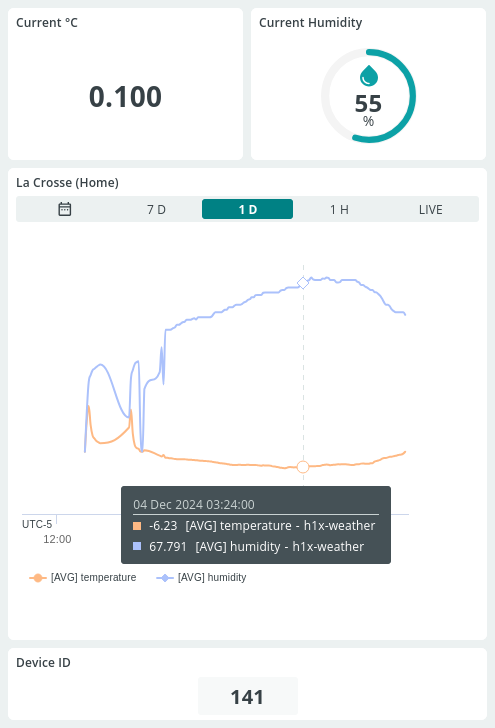
In Arduino Cloud create variables you want to monitor (temperature, humidity, etc — configured as Read Only). Note that replacing the Weather Station’s battery will change its ID. Therefore, create Device ID as Read & Write so you can update it directly from the dashboards.
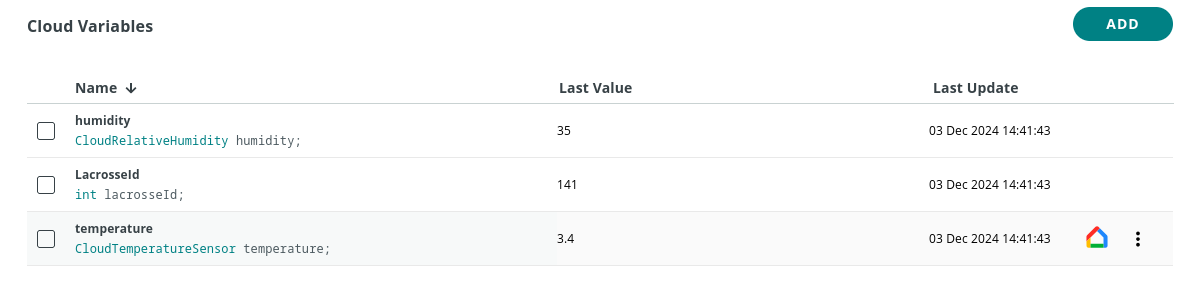
By using a Temperature sensor (°c) type, you can use your vocal assistant to get the value ( Hey google, what is the temperature in room x-y-z? ).
Next, create and add graphs that are linked to the values.
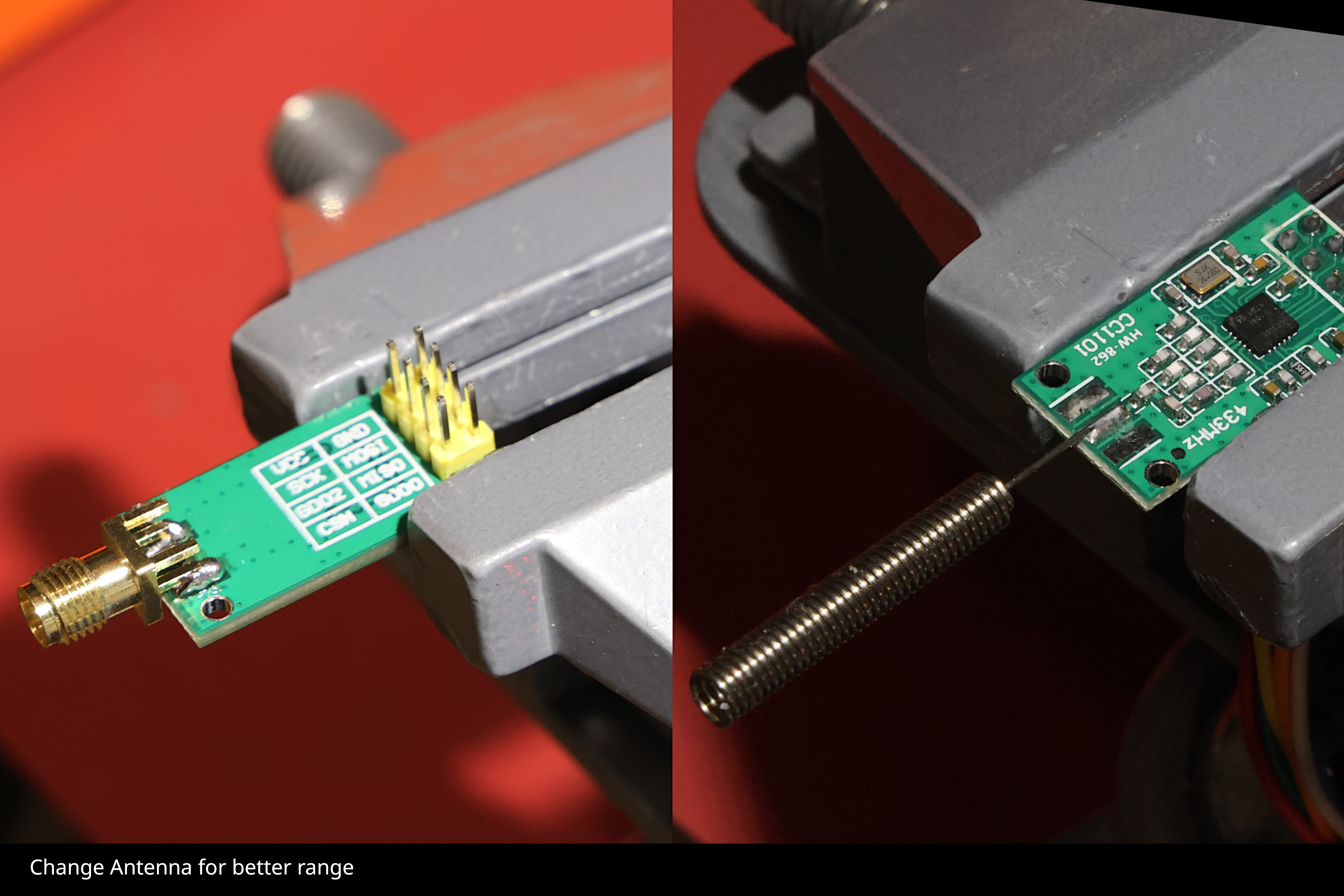
Improve the CC1101 reception range
The chip is frequently supplied with a simple spring antenna. To extend the range of the radio receiver, you can replace it by desoldering it and attaching an SMA female connector.
Wiring
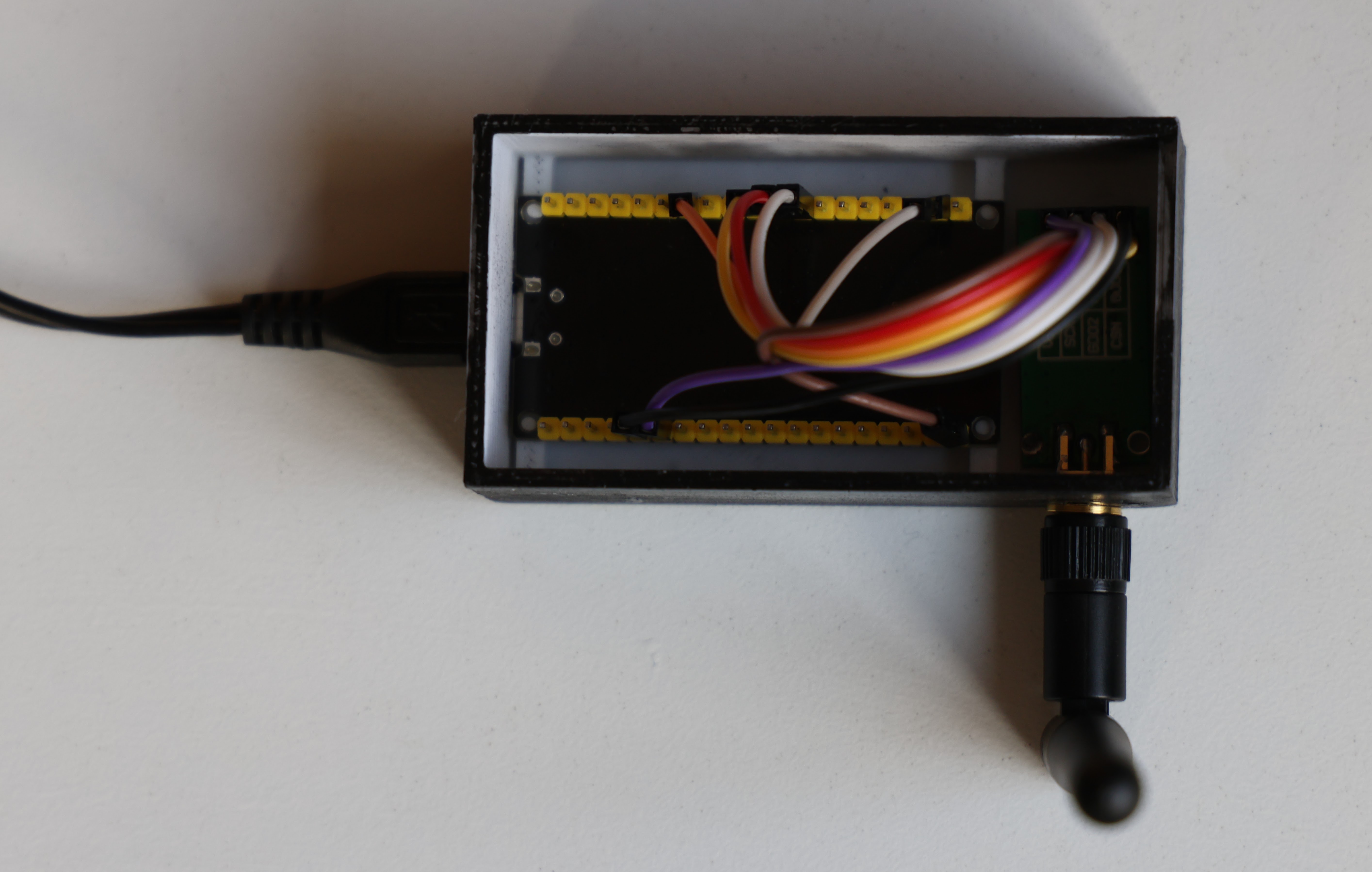
Connect the MCU to the CC1101 as follows (adjust the pins to suit your needs; some can be configured during compilation):
| CC1101 PIN | ESP32 GPIO | Compiler Definition | property |
|---|---|---|---|
GDO0 | 13 | RF_MODULE_GDO0 | |
GDO2 | 4 | RF_MODULE_GDO2 | |
CSN | 5 | RF_MODULE_CS | Default SPI CS |
MOSI | 23 | N/A | Default SPI MOSI |
MISO | 19 | N/A | Default SPI MISO |
SCK | 18 | N/A | Default SPI SCK |
Print the 3D Case
Requirements
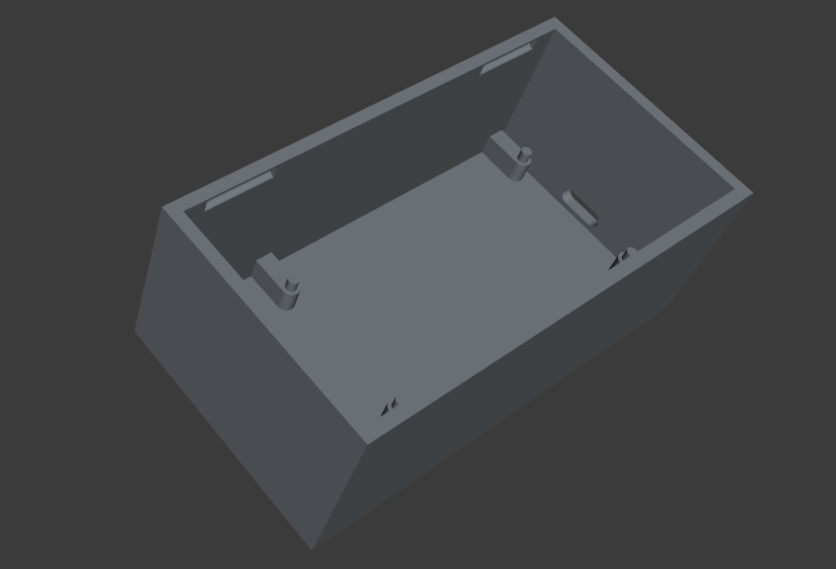
The case requirements include an antenna opening, a micro USB port, pins to hold the ESP32, and a design simple enough for 3D printing. The files provided here for download are a fork of this project.
Files
| Files | property |
|---|---|
| Case to 3D Print | Here |
| Cover to 3D print | Here |
Adapt the Code
Since it will run on an MCU, we need to streamline the library and code to include only what is strictly necessary.
You can git clone my repository tvass/rtl_433_ESP then browse the example/Project-TX141TH-Bv2-with-Arduino-Cloud directory as a starting point.
However, it is probably better to start from the initial project NorthernMan54/rtl_433_ESP to get latest update and create your own project from there.
The initial project doesn’t use Arduino Cloud (opting instead for OpenMQTTGateway), but you only need to add a few files to integrate it.
I’ve provided a reusable template that ensures the inclusion of <ArduinoIoTCloud.h>.
- Copy
thingProperties.h.dist→thingProperties.h. - Set your Wifi configuration, Arduino Cloud credentials, and Arduino Cloud Variables in this new file.
Since the library supports numerous devices, you want to load the only decoders you need:
- In
platformio.ini, ensure-DMY_DEVICESistrue, then add your the decoder for your radio device insignalDecoder.cpp#332(here). Seelacrosse_tx141xin my case. This flag allows you to load a customized list of drivers.
#ifndef MY_DEVICES
//
#else
    memcpy(&cfg->devices[0], &lacrosse_tx141x, sizeof(r_device));
#endif- In the main sketch (
.ino), customize the callback function to suit your requirements. Make sure variables in use here reflects yourinitProperties()fromthingProperties.h.
Essentially, all you need to do is parse the decoder values from the JSON and assign them to the global Arduino Cloud variables. This is a very minimal example:
void rtl_433_Callback(char* message) {
  DynamicJsonBuffer jsonBuffer2(JSON_MSG_BUFFER);
  JsonObject& RFrtl_433_ESPdata = jsonBuffer2.parseObject(message);
  logJson(RFrtl_433_ESPdata);
  count++;

    if (RFrtl_433_ESPdata.containsKey("id") &&
        RFrtl_433_ESPdata["id"] == lacrosseId) {

        if (RFrtl_433_ESPdata.containsKey("temperature_C")) {
            float temp = RFrtl_433_ESPdata["temperature_C"];
            temperature = temp;
        }

        if (RFrtl_433_ESPdata.containsKey("humidity")) {
            float hum = RFrtl_433_ESPdata["humidity"];
            humidity = hum;
        }

  }
}- Build and upload from VSCode Platform.io.
Building .pio/build/esp32_cc1101/firmware.bin
esptool.py v4.5
Creating esp32 image...
Merged 25 ELF sections
[...]
Successfully created esp32 image.
To filter for a specific device if multiple are in range, set the device ID value from the Arduino Cloud. This is used to isolate signals and capture data from a particular sensor.
From the MCU console, the output will show current values it is decoding:
rtl_433_ESP(6): data_output
{"model":"LaCrosse-TX141THBv2",
"id":141,
"channel":0,
"battery_ok":1,"temperature_C":-1.3,"humidity":56,
"test":"No",
"mic":"CRC",
"protocol":"LaCrosse TX141-Bv2, TX141TH-Bv2, TX141-Bv3, TX141W, TX145wsdth, (TFA, ORIA) sensor",
"rssi":-78,
"duration":445002}
Here you are!
A huge thank you to all the contributors of rtl_433 and rtl_433_esp — Truly amazing work!
Further Documentation
Please refer to the README.md in the GitHub repo for updates. Additional info is also available on the Arduino Project page (under review).