
Bridging the Meshtastic Web Client to Serial Devices (over the network)
— By ttyrex
On my roof setup, I have a Raspberry Pi Zero (powered by PoE) connected to my Meshtastic device via USB (serial). The reason for this architecture is simple: when you need to run a wire from your roof to your flat downstairs, you’re limited in the connections you can make.
Having the Meshtastic device in your home and running many meters of antenna cable isn’t an option because of signal loss. Running such a long USB cable is also problematic due to length limitations of USB. This means that if I wanted to maintain control of my Meshtastic device without climbing to the roof during winter, I had to install a Raspberry Pi connected to the Heltec’s USB port (think about update, reboot, esptool, etc…).
And before you suggest it - no, I don’t want to run BLE or WiFi at full power next to the radio chip to reach out the AP in my home… We’re trying to keep the RF environment clean here 🌞

Initially, I was using a Heltec V3 device with built-in WiFi, which made things simple - my Raspberry Pi Zero was connected to my local network via the RJ45/PoE port, and its WiFi chip was in host mode (rx/tx power at min, 1), meaning I could connect the Heltec to this small WiFi network and then access it directly through the Meshtastic web application (with a few iptables rules to bridge the two networks).
However, when I upgraded to a RAK4631, I hit a wall: this device has no WiFi capability. Suddenly, my options were limited to either SSH-ing into the Raspberry Pi or using the Android app with socat to bridge the connection.
While functional, neither solution was ideal because I’m a big fan of the Meshtastic web application and wanted to keep using it.
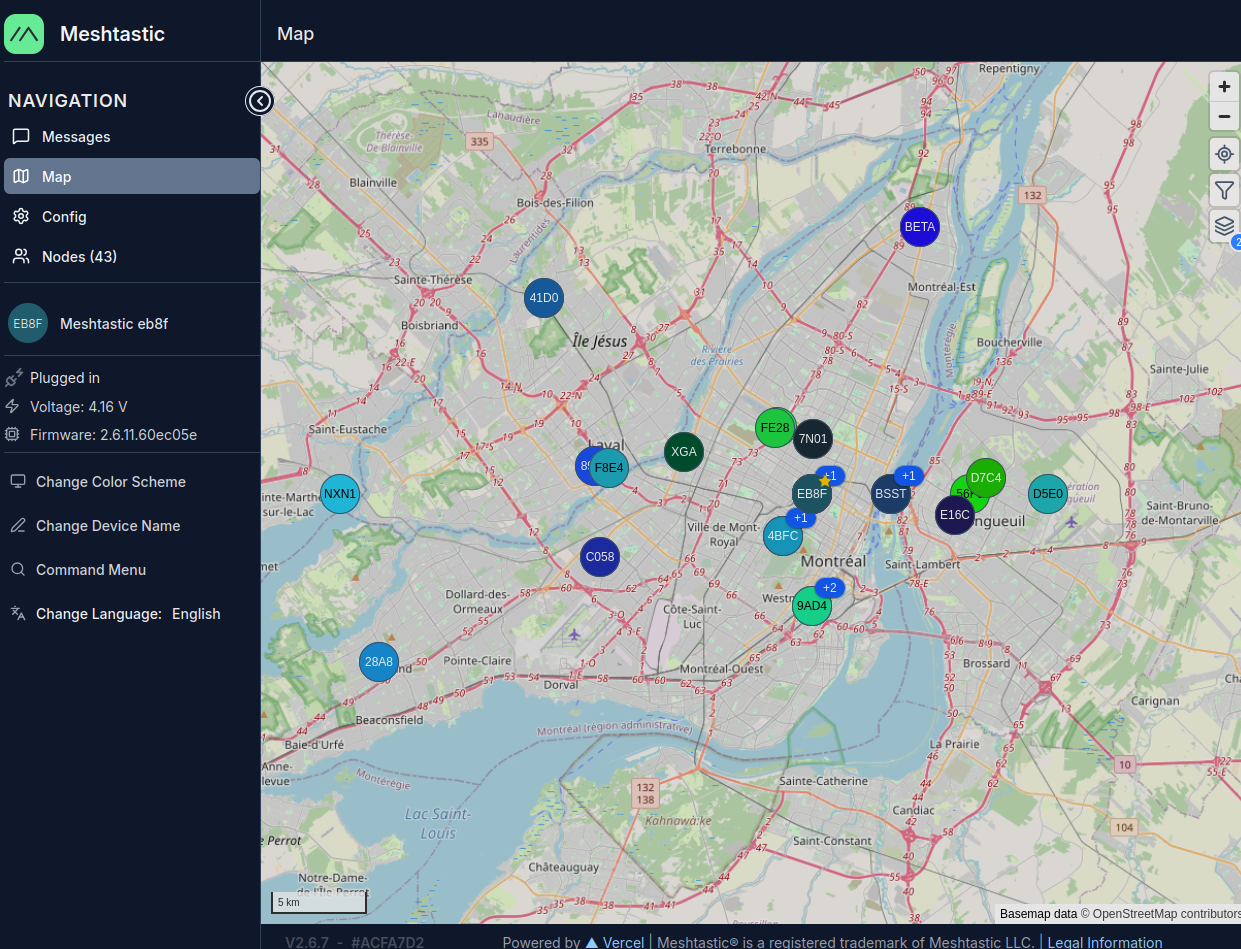
As you can see, running a mesh node on a rooftop dramatically improves range - definitely worth finding a good solution! :)
Solutions That Failed
Option 1: Web Serial API - Chrome’s Web Serial API doesn’t work with remote serial ports exposed via socat. It can only access locally connected physical devices. Even though I wanted to connect directly from my browser to the Raspberry Pi’s the socat serial port, there’s no way to do so with Web Serial support.
Option 2: Meshtasticd - The Meshtastic daemon unfortunately only works with HAT devices such as the Waveshare SX1262, not devices connected via USB.
The challenge was clear: I needed a way to make my WiFi-less device accessible to the browser-based web application.
The Solution
Write a proxy server that solves these challenges by:
- Implementing the Meshtastic HTTP API - Provides standard REST endpoints (
/api/v1/toradioand/api/v1/fromradio) that web applications expect - Bridging all the requests to the device via Serial
Architecture: Iterating to the Final Solution
First Try: Using socat!
In this first try, i had in mind to expose on the remote PoE machine the serial USB Meshtastic device via socat in raw mode.
Browser (HTTPS) → Python Proxy → TCP → socat → Serial Device (/dev/ttyACM0)
                   (port 8080)         (192.168.0.164:4403)
On the command line:
sudo socat -d -d TCP-LISTEN:4403,reuseaddr,fork FILE:/dev/ttyACM0,raw,echo=0,b115200This exposes the serial port as raw TCP on port 4403 (Meshtastic’s default).
At this point, you can use the Meshtastic Android App, but still not the golden Web App…
On my local machine, I ended up with something like this:
python3 app.py --tcp-host 192.168.0.164 --tcp-port 8080 --cert server.crt --key server.keyBy the way, you will always need to run the proxy with TLS certificates (self signed is OK) because of browser security. Without TLS, the browser simply won’t allow an HTTPS-served web application to communicate with an HTTP endpoint, even if it’s on localhost. Since we’re using https://client.meshtastic.org, it means ALL requests must go over TLS (even to localhost or on your local network). This is enforced by the browser’s Mixed Content Policy rule.
openssl req -x509 -newkey rsa:4096 -nodes \
    -keyout server.key \
    -out server.crt \
    -days 365 \
    -subj "/CN=localhost"
Ok cool.
The proxy now connect to the socat server and provides a local HTTPS API endpoint.
I pointed the Meshtastic Web Application to it, eg: https://127.0.0.1:8080 and could access it.
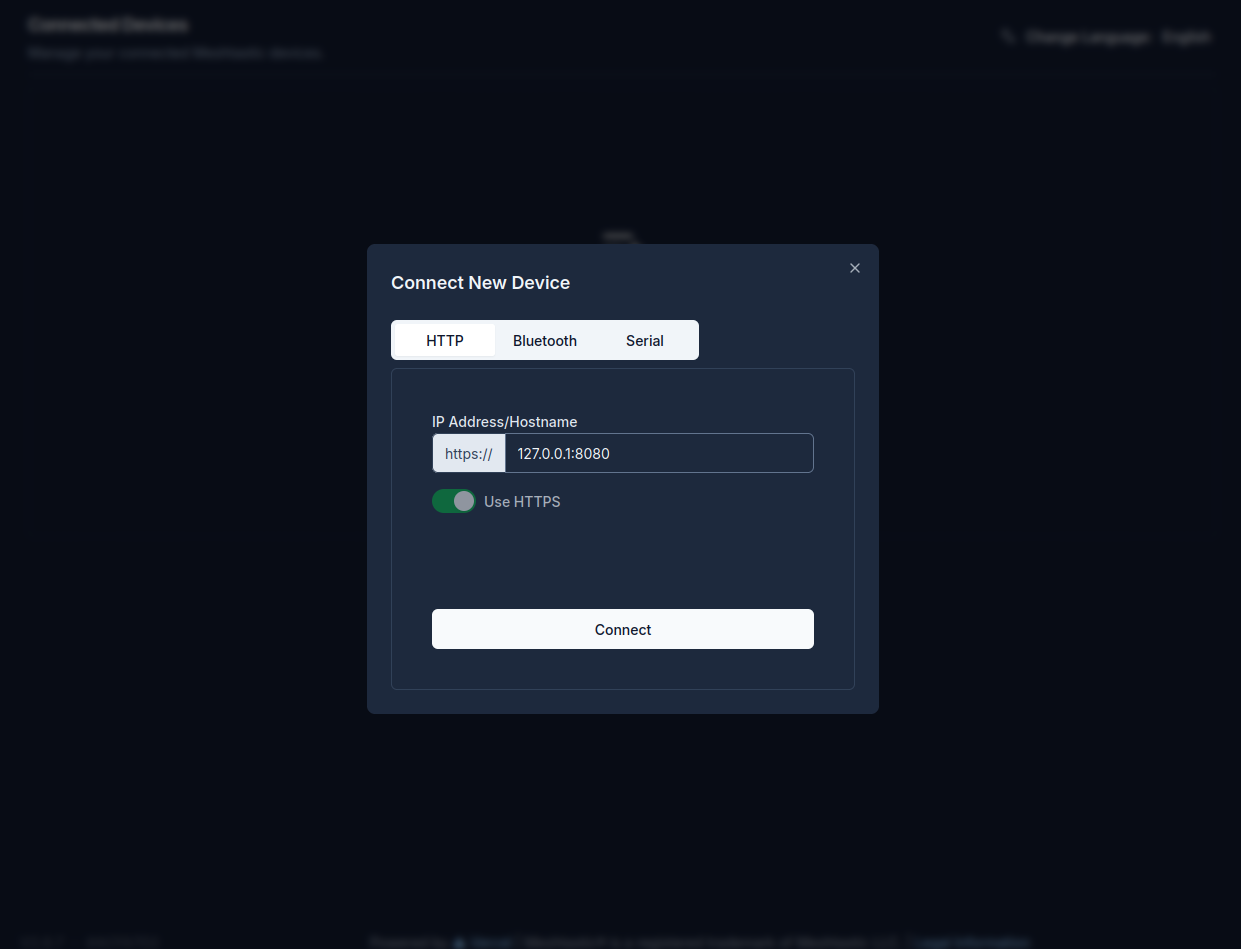
This is Ok but we can do better. I wanted to get rid of socat. Maintaining 2 running services (socat + proxy) felt something very fragile.
Direct Serial Access, But Python Wasn’t Ideal
After this, I implemented a version of this code that you could run directly on the remote target, allowing you to skip socat entirely and run the proxy directly on the Raspberry Pi that has the device plugged into USB.
Browser (HTTPS) → TCP → Python Proxy → Serial Device (/dev/ttyACM0)
                        (port 8080)
However, I still prefered to keep my initial version since Python consumes more memory and CPU than running socat… In the repo, check for the python code app-no-socat.py for this version.
Final Solution: Using Claude and Go
Later, while still playing around with my various options on this snowy Sunday ☃️, I ended up asking Claude to port the no-socat Python code to Go. So, I had in mind creating a minimal binary that runs directly on the Raspberry Pi Zero as a service.
You can find it at github.com/tvass/meshtastic-http-api-to-serial-proxy/golang-portage.
Make sure to compile it for the CPU architecture of your Raspberry Pi (Zero, ARMv6 in my case) and deploy it there to run as a systemd service.
● meshtastic-proxy.service - Redir TCP port to serial
     Loaded: loaded (/etc/systemd/system/meshtastic-proxy.service; disabled; preset: enabled)
     Active: active (running) since Mon 2025-11-10 10:35:10 EST; 12s ago
   Main PID: 2882 (meshtastic-prox)
      Tasks: 4 (limit: 385)
        CPU: 1.330s
     CGroup: /system.slice/meshtastic-proxy.service
             └─2882 /home/thomas/meshtastic-proxy --serial-port /dev/ttyACM0 --port 8080 --cert /home/thomas/server.crt --key /home/thomas/server.key

Nov 10 10:35:10 meshroof systemd[1]: Started meshtastic-proxy.service - Redir TCP port to serial.
Nov 10 10:35:10 meshroof meshtastic-proxy[2882]: 2025/11/10 10:35:10 [INFO] Opening serial port /dev/ttyACM0 at 115200 baud
Nov 10 10:35:10 meshroof meshtastic-proxy[2882]: 2025/11/10 10:35:10 [INFO] Serial port /dev/ttyACM0 opened successfully
Nov 10 10:35:10 meshroof meshtastic-proxy[2882]: 2025/11/10 10:35:10 [INFO] Serial reader thread started
Nov 10 10:35:11 meshroof meshtastic-proxy[2882]: 2025/11/10 10:35:11 [INFO] Starting Meshtastic HTTP API server on https://0.0.0.0:8080
Nov 10 10:35:11 meshroof meshtastic-proxy[2882]: 2025/11/10 10:35:11 [INFO] Endpoints: https://0.0.0.0:8080/api/v1/toradio
Nov 10 10:35:11 meshroof meshtastic-proxy[2882]: 2025/11/10 10:35:11 [INFO]            https://0.0.0.0:8080/api/v1/fromradio
Nov 10 10:35:11 meshroof meshtastic-proxy[2882]: 2025/11/10 10:35:11 [INFO] SSL/TLS enabled with certificate: /home/thomas/server.crt
Then, just point the Meshtastic Web Client directly to https://raspberrypi:8080. This worked perfectly and still remains my option to this day!
Maybe in the future, the web app will handle raw socat directly, but for now, I’m fine with this solution.
Technical Deep Dive
Hey dude, show me the f**** code 😀
The Meshtastic Serial Framing Protocol
Meshtastic uses a simple framing protocol over serial:
- 4-byte header:
0x94 0xc3 [length_msb] [length_lsb] - Payload: Protocol Buffer (protobuf) message (max 512 bytes)
You can read all about the protocol in the Meshtastic Device Client API documentation and Meshtastic Device HTTP API documentation.
The proxy handles:
- Framing outgoing messages: HTTP requests → framed serial packets
- Parsing incoming data: Raw TCP stream → individual protobuf messages
- Buffer management: Handles partial frames and resynchronization
Key Components
1. TCP Reader Thread
Runs in the background, continuously reading from the TCP socket:
- Receives data in chunks (up to 4096 bytes)
- Maintains a byte buffer for incomplete frames
- Parses frame headers and extracts protobuf payloads
- Queues messages for HTTP clients to retrieve
2. HTTP Endpoints
PUT /api/v1/toradio - Send data to the device:
- Receives protobuf data from web client
- Adds 4-byte frame header
- Sends to TCP socket
GET /api/v1/fromradio - Receive data from the device:
- Returns queued messages from the device
- Supports
?all=trueto retrieve multiple messages at once - Returns empty response when no messages available
3. Message Queue
Uses a deque with 256 message capacity to buffer incoming messages, preventing data loss during bursty traffic.
4. Thread Synchronization
A lock (socket_lock) protects TCP socket access between the reader thread and HTTP request handlers.
Lessons Learned
-
Buffer management is critical - The frame parsing logic must stay in the same scope as the buffer variable. Extracting it into separate methods broke the buffer reassignment (
buffer = buffer[4+msg_len:]). -
socat is 1-to-1 - Only one client can connect at a time. Having the phone app connected simultaneously caused intermittent failures.
-
The protocol is stable - Once implemented correctly, this proxy should work with any Meshtastic web application without modifications, as it faithfully implements the standard HTTP API.
Repository
Check out the full source code here.
That’s all folks! Hope you had fun, and keep hacking. Thanks Python, Claude, and happy meshing!
^EOF
🤖 Please note that I have used ChatGPT to help with my English in this article. If you come across any words that seem off topic or like a hallucination, please let me know. Thank you.